The Watch tab: a face that is also a conversation
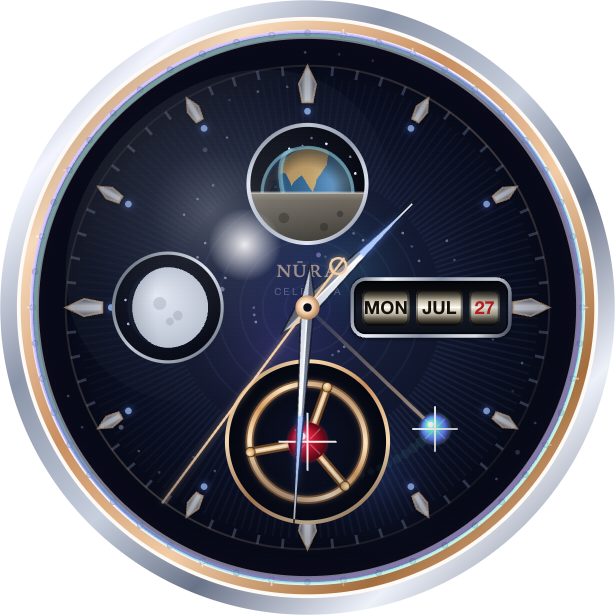
Open the Watch tab in NURA and you get one full-screen surface with a deliberate refusal built into it: it is not a chat window. No bubbles, no sender colours, no left/right alignment, no scrolling transcript, no message bar waiting at the bottom. Those are the visual grammar of talking to a bot somewhere else. NURA's watch face is one voice — the watch itself — telling you the time, what is next, and, when you ask, whatever you needed to know.
This is the Watch world built by NuroNova Genix Co. (Delaware; headquartered in Houston, Texas). Here is what is actually on the screen.
The time
At the top sits a large, firm digital clock — hours and minutes with a slim seconds column and, in 12-hour mode, an AM/PM badge beneath it. It uses tabular figures so the digits never shuffle sideways as they tick, and it honours your format preference: 12-hour, 24-hour, or Follow my phone, which reads the device setting so the app never disagrees with the rest of iOS. When you start speaking to NURA, the clock gracefully recedes — scaling down and softening rather than vanishing — so her words can hold the screen. It is still a watch, even mid-sentence.
The next-prayer line
Directly under the hour, NURA surfaces one line about your day — never four. Crucially, this line is deterministic: it is computed by the on-device prayer and day-planning engines, not written by a language model, so what the face says and what the app knows can never drift apart. It follows a strict priority order:
| Priority | What she surfaces |
|---|---|
| 1 | A time-critical risk in your day |
| 2 | "Time to leave." when you need to go now |
| 3 | A prayer within the next 30 minutes ("Dhuhr in 12 min.") |
| 4 | What you're in the middle of |
| 5 | What's coming next, with a countdown |
| 6 | Free time ahead, when there is some |
| 7 | The next prayer, in plain 12-hour time ("Maghrib at 8:14 PM") |
| 8 | "Your day is clear." |
Only the single most important item is ever shown. A watch that lists everything is a dashboard; a companion who says four things at once is not listening.
The living dial
Between the time and the voice dial sits Celestia — the hand-drawn Canvas watch face with its live Earthrise, real moon-phase, flying tourbillon, and mechanical day-date. It is sized to match the Qibla compass on the next tab, and it steps back to a compact size while NURA is speaking, then returns to full when the face is at rest.
The talk-to-her dial
You speak to NURA through a physical-feeling dial at the bottom of the face — a thing you press, not a text box with a send arrow. It runs a clean state machine you can see in the ring:
- Idle — a quiet hairline ring: "Hold the dial to speak."
- Listening — the ring turns green and breathes outward as it hears you, showing a live partial transcript.
- Thinking — three pulsing dots while she works.
- Speaking — a gold, voice-pulsing core; tap again to interrupt her.
Her reply appears on the face, centred, in the same light type as the time — no bubble, no name. Your own words show as a small echo that dissolves: you spoke, she heard, it is hers now. Typing lives one tap away behind a Type button for when speaking isn't possible, and an Earlier button reveals the history only when you actually want it.
She speaks first
The real difference between a chatbot and a companion is that one waits to be addressed and the other is already paying attention. When nothing is happening, NURA surfaces what she has noticed — the next prayer, what's running, whether it's time to leave — all from the same deterministic engines that drive the prayer line.
What she can read — and where it goes
When you ask her something, NURA's optional AI reads your on-device engines as read-only tools: the clock, prayer times, your schedule and notes, a consented health summary, your current place, a hedged presence read ("your phone was still about 7 hours overnight"), and a contacts search that returns only what you looked up. The engines decide what is true; she only reports it.
On privacy, precisely: there is no NuroNova server for the core app. Prayer settings, places, notes, health entries, and contacts stay on your device. The AI is optional and bring-your-own-key — only when you enable it and paste your own OpenAI, Anthropic, or Together key does your message text go, directly from your phone under your own provider account, to the provider you chose. NURA never proxies, sees, or stores it. If no key is connected, the dial invites you to Wake NURA; the clock, the prayer line, and the living dial keep working regardless.
Watch settings
A small settings pane governs the face: the 12/24-hour choice above, and a Keep the screen awake switch so the hourly chime, the full athan, the motion alarm, and the pickup announcement can run while NURA is open.
NURA is a free, watch-first Muslim life-companion for iPhone from NuroNova Genix Co. — coming soon to iPhone.
Get the athan, live — free
These times update every day. The NURA app keeps them live on your phone, calls the full athan at prayer time, points the Qibla, and shows it all on a living watch face — working offline, no account, no sign-in.
NURA — coming soon to iPhone