The Book — your life, written down
The Book is a blank page you write on — and so can Noora, once you have connected her. To-dos, goals, and notes about how something went, organised by day and kept on your phone. It reads first: you turn through the days and tick things off, and the page stays quiet until you or Noora put something on it.
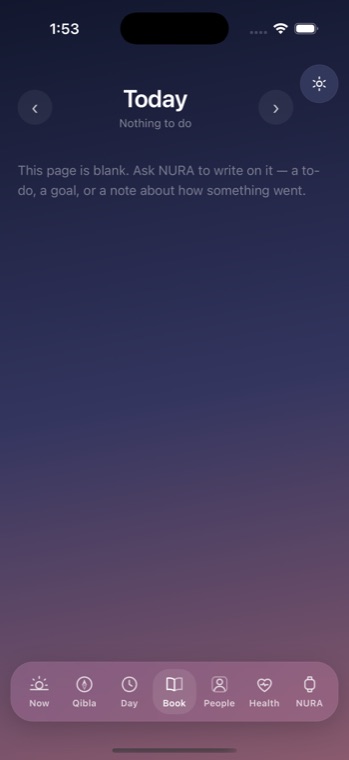
One page for each day
The header carries ‹ and › arrows to turn to the previous or next day, the page's title, and a quiet sub-line that reads "N to do" — or "Nothing to do" — followed by N scheduled. Wander off from the current day and a "Back to today" button appears to bring you home in one tap.
What a page holds
Each section shows only when it has something in it, so a page never looks busier than your day actually is:
- "Aiming at" — your missions and goals for the day, tagged Mission and Goal.
- "The hours" — hour lanes holding appointments and timed to-dos. An appointment keeps its own notes in two phases: "Before" and, afterwards, "What happened".
- "Anytime" — margin to-dos that belong to no particular hour.
- "Notes" — loose notes.
- "No longer on your calendar" — notes whose appointment has gone, kept rather than silently dropped, tagged with the title they used to sit under.
Read first, a tick to write
The smallest change you can make is tapping a to-do to toggle it done or open. Anything Noora wrote carries a small "n" ink mark so you always know whose hand it was, and anything you have kept private simply reads "Private".
When the page is empty
A fresh day opens to its own honest invitation:
"This page is blank. Ask NURA to write on it — a to-do, a goal, or a note about how something went."
How Noora writes on it
Noora is optional. Connect her with your own AI key and she can read any page and write to it — a to-do you dictate, a goal you name, a note on how a meeting went. She does not act on her own: every write she proposes passes through the same permission gates you would use yourself.
The Book lives on your device. Each page is assembled — the live agenda joined with whatever was written on that day — so the Book never becomes a second, competing copy of your schedule. The agenda stays the only thing that can ring; the Book is where the day is written down.
Get the athan, live — free
These times update every day. The NURA app keeps them live on your phone, calls the full athan at prayer time, points the Qibla, and shows it all on a living watch face — working offline, no account, no sign-in.
NURA — coming soon to iPhone