The Day tab — NURA reads your time
The Day tab is where NURA shows her reading of your time. It has no forms and no settings — it is read-only by design. Every line on it is computed by deterministic engines on your phone: the day-director, AutoPilot, and your own agenda. Nothing on this screen is written by a language model.
What is happening right now
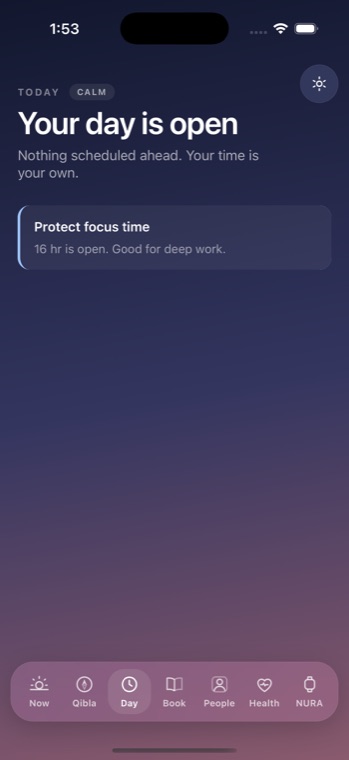
The tab answers one question first, plainly. While it works out the day it shows "Reading your day…", then leads with a hero kicked off by "Right now", "Next", or "Today" — the thing you are in the middle of, the thing coming next, or, when the hours are genuinely empty, "Your day is open" and "Nothing scheduled ahead." Urgency is carried by tone and colour — overdue, soon, upcoming, later — so a glance is usually enough. A small day-heat badge marks whether the day reads calm or busy.
A timeline you read, not parse
Below the hero sits a single band with marks placed by the day-director engine, a "now" line, and hour ticks every other hour. Private items appear only as "Private" — the tab never exposes what it does not need to. The engine never invents events or travel time; a trip is drawn only when the item you saved carries its own travel detail.
What is worth saying, and what she noticed
One "insight" line offers her single most useful observation — either an AutoPilot suggestion or the top day-director recommendation, each paired with its plain "why". A "Coming up" list then ranks the slots ahead: a time that never wraps, a kind glyph (◉ alarm, ◑ appointment, ◎ reminder, ➔ travel), the title, an optional place, and a countdown. It disappears entirely when the day is clear. Last comes "She noticed" — the AutoPilot activity log, the last six things she actually observed, each with a timestamp.
The Day tab cannot act
It reads; it does not schedule. Alarms and appointments come from your agenda — set on the watch face or in Settings — and the app hands those to iOS. The Day tab shows the day back to you and stops there. To talk to NURA, you go to the watch face; to change her behaviour, you go to Settings.
AutoPilot decides how much she speaks
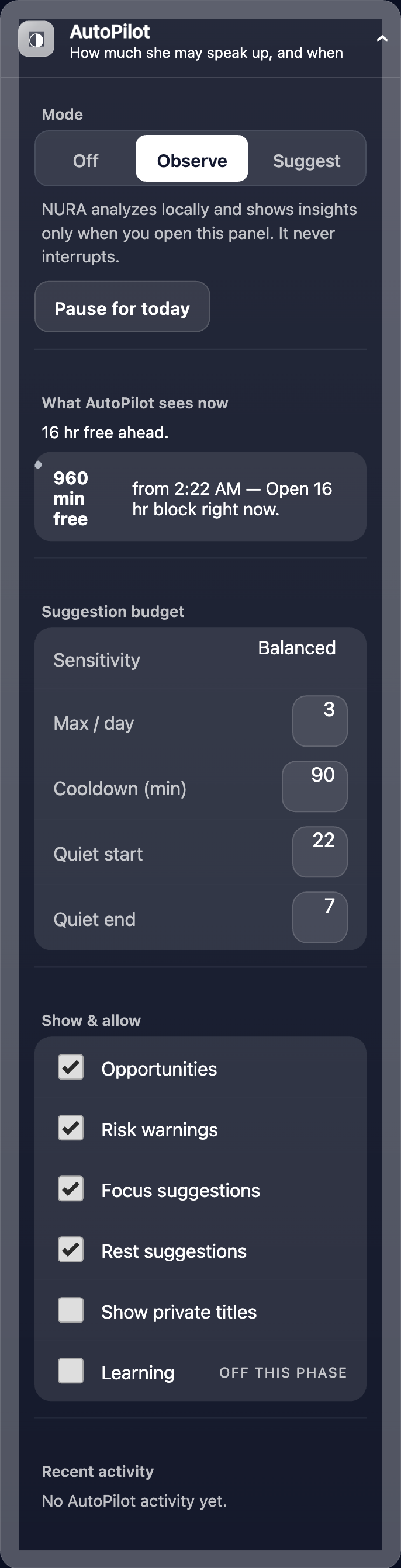
How forward NURA is allowed to be is governed by AutoPilot, whose controls sit in Settings, not on this tab. You choose whether she may only "Observe" or also "Suggest", set a strict budget for how often she may speak up, and keep quiet hours she will not break. All of it is worked out on your phone — AutoPilot uses no language model and no network. It reads your free gaps, prep and travel windows, overlaps and schedule risk, and leans toward protecting open time rather than filling it, offering at most one primary suggestion at a time.
Everything on the Day tab is analysed on-device. Noora, the optional AI, needs your own API key and never writes what appears here — she can read the same day, but the deterministic engines decide it. There is no background tracking behind this screen.
Get the athan, live — free
These times update every day. The NURA app keeps them live on your phone, calls the full athan at prayer time, points the Qibla, and shows it all on a living watch face — working offline, no account, no sign-in.
NURA — coming soon to iPhone