The Now tab
The Now tab is NURA's home screen — one calm surface that answers a single question: when do you pray next? It runs entirely on the app's deterministic prayer engine, on your phone, with no account, no network and no AI key required. The whole screen quietly wears the colour of the next prayer's sky.
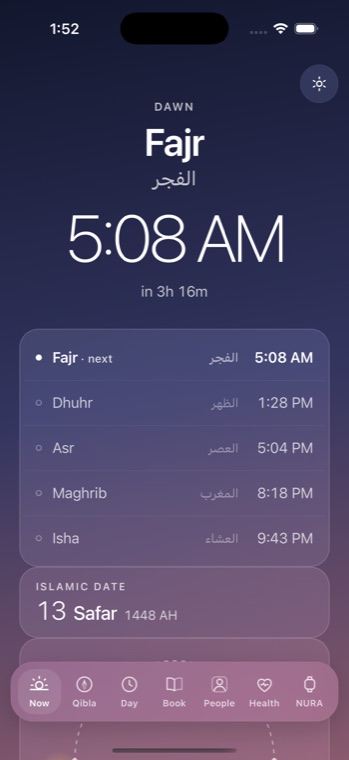
The next prayer, front and centre
At the top sits the answer. The next prayer's name appears in English and Arabic — Fajr الفجر, Dhuhr الظهر, Asr العصر, Maghrib المغرب, Isha العشاء — with its clock time and a live “until” countdown that ticks every thirty seconds. When the day's prayers are all behind you, it reads “All prayers done” and “Rest well.”
Today's five times
Below the hero, a frosted card lists the day's five prayers, each with its Arabic name. The next one is marked with a filled dot, heavier type and a small “ · next” tag, so a single glance tells you where you stand in the day.
The Hijri date, sunrise and the daylight arc
An “Islamic Date” card shows the Hijri day, month name and year AH, recomputed every minute. Beneath it, the Sun's arc is drawn as it actually is: sunrise on the left, sunset on the right, and the sun riding the curve at the true fraction of daylight elapsed. It names the length of your day — “7h 05m of daylight” — and, at the far latitudes, tells the truth rather than a fabricated time: “Midnight sun” or “Polar night.”
Quick tools, without leaving the prayer screen
Three tools live on the Now screen itself. The tasbih counter is a large tappable bead with a progress ring; it counts dhikr in phases of 33 up to 99, with haptics that build from light to a heavy pulse and glow at 99, an Arabic name with transliteration, a Reset button, and a count that survives leaving the screen. The stopwatch offers Start, Stop, Lap and Reset. The timer carries presets — 1m, 3m, 5m, 10m — and, at zero, fires a heavy haptic, a Casio chime and a flashing “Time's up” banner you dismiss.
A little further — a swipe away
Two more tools sit just past Now, reached by swiping left from this screen: a world clock with live city times, a day-offset badge and a day/night dot, and a water tracker you tap to fill toward a daily goal that resets at midnight. They belong to Now's family of quick tools — one page away rather than on the screen itself.
Before your city is set
With no location chosen, the tab reads “Prayer times” and offers a single button, “Choose my city.” Its promise is plain: “Choose your city and NURA will keep the times for you — on your phone, with no account.”
The Now tab uses no server, no model and no network. Prayer times, the Hijri date and the Sun's arc are all computed on-device from your latitude, longitude and timezone. A footer shows your city label and a 12h / 24h switch that sets the app-wide time format. Noora, the optional AI, is never involved here and cannot produce or adjust a prayer time.
Get the athan, live — free
These times update every day. The NURA app keeps them live on your phone, calls the full athan at prayer time, points the Qibla, and shows it all on a living watch face — working offline, no account, no sign-in.
NURA — coming soon to iPhone