Connect an AI to NURA — your key, your account, your device
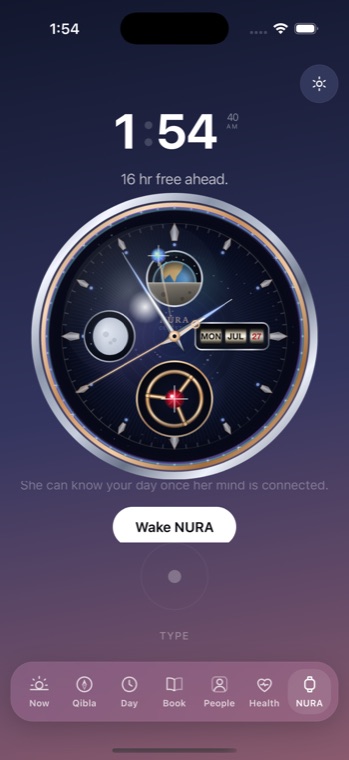
NURA is a watch-first Muslim life-companion for iPhone by NuroNova Genix Co. (Delaware-registered, headquartered in Houston, Texas). Everything that makes NURA a prayer companion works with no account, no sign-in, and no internet: prayer times, Qibla, the full athan, adhkar, the khatm tracker, the 99 Names, the zakat calculator, tasbih and the living Celestia watch face are all computed deterministically on your device. The AI assistant, whose persona is Noora, is a separate, entirely optional layer. This page explains exactly how to turn it on.
The AI is optional, and it is bring-your-own-key
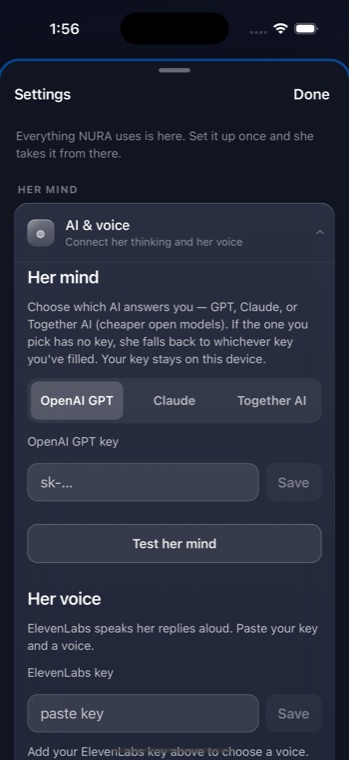
NURA does not ship with a language model baked in, and it does not run an AI server. A key compiled into an app can be extracted by anyone who downloads that app, so instead NURA asks you to bring your own account. In Settings → Connect you paste a key from one of three providers, and only then does your message text leave the phone — going directly from your device to the provider you chose, under your own account. NuroNova never proxies, sees, or stores that traffic, because there is no NuroNova server for it to pass through.
Three providers, one picker
NURA supports three language-model providers. You pick one; if the one you selected has no key saved, NURA quietly falls back to whichever key you have filled, so a half-finished setup still works.
| Provider | Default model | Endpoint your phone talks to | Key looks like |
|---|---|---|---|
| OpenAI GPT | gpt-4o-mini | api.openai.com | sk-… |
| Anthropic (Claude) | claude-sonnet-5 | api.anthropic.com | sk-ant-… |
| Together AI | Llama 3.3 70B Turbo | api.together.xyz | (does not start with sk-) |
Together AI runs cheaper open models — Llama, Qwen, DeepSeek, Mixtral — on an OpenAI-compatible API, so NURA reuses the exact same request path and only changes the host it sends to. NURA's Together picker deliberately lists only models that support tool calling, so you can never land on a model that would chat but silently fail to set an alarm or read your day.
What the AI actually does: it reads the engines as tools
Noora is not a chatbot answering from memory. NURA exposes its on-device engines to the model as callable tools — get_prayer_times, get_location, get_day, get_health, get_presence, get_routines, get_time, find_contact, read_book — plus a set of validated actions (schedule something, set an alarm, mark a prayer). Reads are answered from a snapshot; actions are checked by a planner and then handed to the app, which owns every engine handle. That design means the model can ask, but it can never reach past the app to change something on its own. The current date and time are injected on every request so an assistant whose whole subject is your time never guesses what day it is.
What it costs — the honest version
Text conversation on a cheap model is genuinely inexpensive — typically pennies for ordinary daily use, because you pay your provider per token and NURA keeps each turn short and bounded. Together AI with a Qwen model is the cheapest option. Anthropic's Claude Sonnet is the most capable of the defaults and costs a little more per message. Voice is the expensive part: NURA can speak replies aloud through ElevenLabs (a separate, optional key), and text-to-speech is billed by characters, which adds up far faster than text. Prices change, so check each provider's own pricing page — but for text, expect a few dollars of credit to last a long time.
Precisely how your key is handled
- Your key is stored in your device's local storage, entered by you, and read back only to authenticate your own requests.
- It is never logged, echoed, or sent anywhere except the one provider it belongs to.
- A stored key is only ever shown to you masked — the last four characters — so a screenshot or screen-share cannot leak it.
- NURA guards against a misfiled key: a Claude key (
sk-ant-) pasted under OpenAI is refused before it can be sent to the wrong company, and vice-versa. - The Test her mind button sends a tiny four-token request on your key and tells you exactly which model answered — so you learn a key is wrong in Settings, not mid-conversation.
Because the AI is optional, none of this is required to use NURA as a prayer companion. It is here for the people who want a companion that can plan the day, and it is built so that turning it on never quietly hands your data or your key to us.
Set up your key
Step-by-step guides for each provider — create the account, add billing, generate the key, and paste it into NURA:
- Get an OpenAI key
- Get an Anthropic (Claude) key
- Get a Together AI key — the cheapest path, especially with Qwen
NURA is free and coming soon to iPhone. The prayer companion needs no key and no account; the AI is there when you want it, on your terms.
Get the athan, live — free
These times update every day. The NURA app keeps them live on your phone, calls the full athan at prayer time, points the Qibla, and shows it all on a living watch face — working offline, no account, no sign-in.
NURA — coming soon to iPhone