Setting up your prayer times
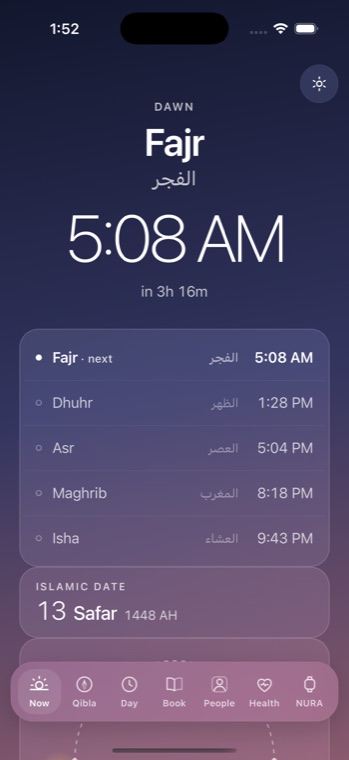
NURA computes your five daily prayers on your iPhone from solar astronomy — no network call, no model, no heuristic. The same inputs always yield the same times, because prayer is worship and the calculator treats it that way. This page walks through the four things you can set: your location, the calculation method, the athan, and how you are notified. Everything here is by NuroNova Genix Co.
1. Location
Prayer times need a latitude, a longitude, and a timezone. Open Settings → Prayer (or tap “Choose my city” on the home screen) and pick from three ways to set your place:
- Pick a city — start typing and choose from the bundled table of 221 cities. One tap writes the coordinates and the correct timezone. Nothing is searched online.
- Set it manually — enter your own exact latitude and longitude for times computed for precisely where you are, rather than a city centre.
- Use the device location — on the phone build, let iOS provide your coordinates once.
City coordinates are good to a few kilometres — under a minute of difference for a nearby city. If you want exact times, enter your own coordinates.
2. Calculation method
The angle of the sun below the horizon that defines Fajr and Isha differs between authorities, so NURA lets you choose. The default is the Muslim World League. Eleven methods are built in, each using its published convention:
| Method | Fajr / Isha convention |
|---|---|
| Muslim World League (default) | 18° / 17° |
| Islamic Society of North America (ISNA) | 15° / 15° |
| Egyptian General Authority of Survey | 19.5° / 17.5° |
| Umm al-Qura, Makkah | 18.5° / 90 min after Maghrib |
| University of Islamic Sciences, Karachi | 18° / 18° |
| Dubai, Qatar, Kuwait, Singapore, Tehran, Jafari | each authority’s own angles/intervals |
The Asr setting is separate and changes the Asr time only: Standard (Shafi’i, Maliki, Hanbali — shadow equal to the object) or Hanafi (shadow twice the object). For extreme latitudes where the sun never reaches the Fajr or Isha angle, a high-latitude rule (middle of the night, one-seventh of the night, or a twilight-angle fraction) fills the gap — and NURA labels such a time as adjusted rather than pretending it was observed. If the sky genuinely cannot answer (polar day), it shows the time as unavailable instead of inventing one. You can also apply a small per-prayer minute offset to match your local mosque.
3. The athan
The athan is off by default — you turn it on deliberately in Settings → Prayer, with a separate switch for whether it also sounds at Fajr. Once on, it is governed by hard rules you don’t have to think about: the athan never plays during a phone call, while you are driving, or in a meeting, whatever else is set. It never overlaps itself, and it never sounds twice for the same prayer, even across an app refresh.
Your quiet policy decides how a prayer arrives: visual only (the default), vibrate only, or allow the athan. You can audition the sound any time with “Hear the athan”, and import your own recording under Sounds. When a prayer arrives while the app is open, NURA plays the full athan and gives you Stop, Pause, and Mute controls throughout.
4. Notifications
So a prayer reaches you even when NURA is closed, the app hands each upcoming prayer to iOS as a scheduled notification — they fire with the app in the background. The Prayer settings show you honestly whether iOS has granted notifications, exact timing, and background scheduling, so you can see the delivery is really set up rather than assume it. The scheduled notification carries the opening of the athan; the full athan plays in-app when you open NURA at prayer time. If a prayer’s time changes (you switch method or travel), NURA reconciles the schedule and re-registers only its own prayer notifications, never touching your alarms.
Set your city, choose a method, and decide how you want to be called — that is the whole of it. NURA is free, computes every time on your device with no account, and is coming soon to iPhone from NuroNova Genix Co. (Delaware; headquartered in Houston, Texas).
Get the athan, live — free
These times update every day. The NURA app keeps them live on your phone, calls the full athan at prayer time, points the Qibla, and shows it all on a living watch face — working offline, no account, no sign-in.
NURA — coming soon to iPhone