Getting started with NURA
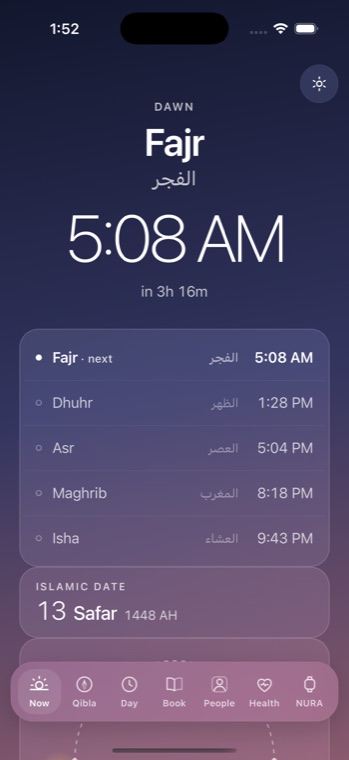
NURA is a watch-first Muslim life companion for iPhone from NuroNova Genix Co. It is built so the first thing you do is also the last thing you have to do: open it, tell it your city once, and it keeps your prayer times from then on. There is no account to create, no email to verify, and no sign-in wall — nothing stands between you and the times.
The first screen: “Choose my city”
When you open NURA the first time, the home screen (the Now tab) greets you with a single instruction and a single button: Choose my city. Prayer times are the one thing the app genuinely cannot compute without knowing where on Earth you are, so it asks for exactly that and nothing more.
Tap the button, start typing your city, and pick it from the list. NURA carries a bundled table of 221 cities worldwide — each with a latitude, a longitude, and the correct IANA timezone — so nothing is searched over the internet. Choosing a city is the entire opt-in: the moment you tap it, prayer times switch on, the timezone and coordinates are written, and the Now screen fills with today’s five prayers and a live countdown to the next one.
If your town is not in the list, open “Set it manually” and enter your own exact latitude and longitude. City coordinates are approximate — for a nearby city the difference is under a minute — but your own coordinates give the exact times for precisely where you stand.
It just works offline
NURA computes prayer times deterministically on your device from solar astronomy — the sun’s declination and hour angles for your exact coordinates — using the Muslim World League method by default. It is the same engine that powers the 10,381-page reference site nuraprayer.com. Because the mathematics runs on the phone, the core of the app needs no network, no server, and no AI key:
| Works fully offline | Needs a connection |
|---|---|
| Prayer times & the countdown to the next prayer | Only the optional AI assistant (“Noora”), and only if you turn it on |
| Qibla compass, the full athan, and every daily tool | |
| Adhkar, Qur’an khatm tracker, the 99 Names, zakat, tasbih, Hijri date | |
| The living “Celestia” watch face and the digital clock |
Turn on airplane mode after you have chosen your city and the app carries on exactly as before. Put the phone away for a week and the times are still right the day you open it again, because they were never fetched — they were calculated.
Where your data lives
There is no NuroNova server for the core app. Your prayer settings, your chosen city, your tool progress, and everything else you enter are stored on your device, not on our servers — we don’t run any. The app went through an independent 14-agent adversarial bug audit (22 real bugs found, 21 fixed and shipped) and a 14-agent security review, so “on-device” is an engineering posture, not a slogan.
The AI assistant is entirely optional and bring-your-own-key. Only if you enable it and paste your own OpenAI, Anthropic, or Together key does your message text leave the phone — sent directly, under your own provider account, to the provider you chose. NURA never proxies it, sees it, or stores it. If you never turn the AI on, no message text ever leaves your phone.
Finding your way around
The bottom bar carries seven worlds — Now, Qibla, Day, Book, Contacts, Health, and Watch — and you can swipe left and right between them. Swiping left from the Now screen reveals eight hidden daily tools one page at a time (adhkar, Qur’an, the 99 Names, Ramadan, duas, zakat, world clock, water) before you reach the Qibla. The gear in the top-right opens Settings, where every area — prayer, watch, chimes, privacy — expands in place on one screen.
That is the whole first run: choose a city, and NURA does the rest. NURA is a free app by NuroNova Genix Co. (Delaware-registered, headquartered in Houston, Texas), coming soon to iPhone.
Get the athan, live — free
These times update every day. The NURA app keeps them live on your phone, calls the full athan at prayer time, points the Qibla, and shows it all on a living watch face — working offline, no account, no sign-in.
NURA — coming soon to iPhone