Get a Together AI API key and connect it to NURA (cheapest option)
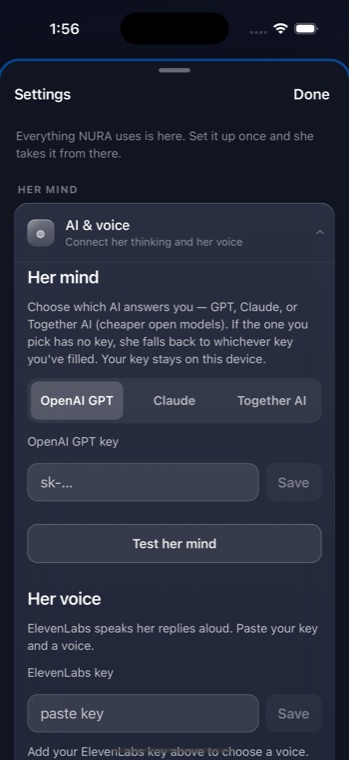
Together AI is the cheapest way to give NURA's optional assistant, Noora, a mind. It runs open models — Llama, Qwen, DeepSeek, Mixtral — on an OpenAI-compatible API, so NURA reuses the exact same request path and just points it at api.together.xyz. As always, the key stays on your device and your messages go directly from your phone to Together — NuroNova Genix Co. runs no server in between. For the other two providers, see OpenAI and Anthropic (Claude), or the overview at Connect an AI to NURA.
1. Create a Together AI account
Go to together.ai (the API dashboard lives at api.together.xyz) and sign up. New accounts often start with a small amount of free credit, so you can usually test NURA before adding any payment method at all.
2. Add billing (when the free credit runs out)
To keep using the API beyond the starter credit, open Settings → Billing and add a payment method. Together is pay-as-you-go and its small models are so inexpensive that a little credit lasts a very long time for personal use.
3. Generate the API key
Go to Settings → API Keys and create a key. Copy it and keep it somewhere safe. Unlike OpenAI and Anthropic, a Together key does not start with sk- — that difference is exactly how NURA tells the providers apart.
4. Paste it into NURA and pick a model
- Open NURA and go to Settings → Connect.
- Under Her mind, choose Together AI.
- Paste your key and tap Save — it is stored on-device and shown only masked afterwards.
- Choose a Together model from the picker. Every model listed is tool-capable, so whichever you pick can still set alarms and read your day.
- Tap Test her mind to confirm the model answers.
NURA refuses an sk- key saved under Together, so an OpenAI or Claude key can never be sent to the wrong host by mistake.
Which model to choose
NURA groups the models biggest to smallest — bigger is more capable, smaller is cheaper and faster:
| Model | Size | Good for |
|---|---|---|
| Llama 3.1 405B / DeepSeek V3 | Huge | most capable |
| Llama 3.3 70B (default) / Qwen 2.5 72B / Llama 3.1 70B | Big | best balance |
| Mixtral 8×7B | Medium | leaner |
| Llama 3.1 8B / Qwen 2.5 7B | Small | fastest & cheapest |
NURA's default is Llama 3.3 70B Turbo — a strong, cheap, tool-capable balance. For the absolute lowest cost, pick a Qwen model: Together AI with Qwen is the cheapest path of all three providers.
What it will cost
Together's small open models are priced far below the big commercial models, so running NURA's assistant here is genuinely low-cost — often a small fraction of a cent per short exchange, meaning a few dollars of credit can last a very long time. Bigger models cost more but are still modest for personal use. Exact per-token prices change, so check Together's pricing page for current numbers. If cost is your main concern, a Qwen model on Together is the answer.
Voice is separate and more expensive. Speaking replies aloud uses an ElevenLabs key (billed by characters), not your Together key — text-only keeps the assistant at its cheapest.
Keeping it safe
- Your key never leaves your device except to Together AI, and NURA never logs or shows it in full — only masked, last four characters.
- If a key is ever exposed, delete it in the Together dashboard and create a new one to revoke it.
NURA is free and coming soon to iPhone. The prayer companion needs no key at all; Together AI is simply the most affordable way to add the optional assistant, running on your own account and your own device.
Get the athan, live — free
These times update every day. The NURA app keeps them live on your phone, calls the full athan at prayer time, points the Qibla, and shows it all on a living watch face — working offline, no account, no sign-in.
NURA — coming soon to iPhone