Get an Anthropic (Claude) API key and connect it to NURA
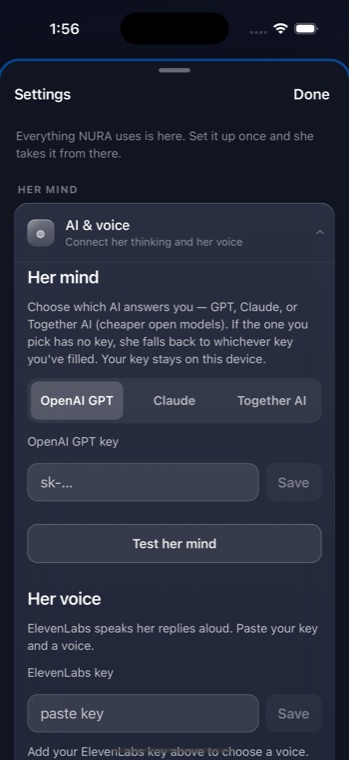
NURA's optional AI assistant, Noora, can think with Anthropic's Claude models using your own Anthropic account. The key lives on your device, and your messages go directly from your phone to api.anthropic.com — NuroNova Genix Co. runs no server in between. Claude is the most capable of NURA's three default models. Here is the full setup. For the cheapest option instead, see the Together AI guide; for all three providers side by side, see Connect an AI to NURA.
1. Create an Anthropic Console account
Go to console.anthropic.com and sign up (or sign in). The Console is Anthropic's developer platform — separate from the Claude.ai chat app. An API key from the Console is what NURA needs, not a Claude.ai subscription.
2. Add credit
Claude's API is prepaid. Open Settings → Billing (Plans & Billing), add a payment method, and buy a small amount of credit — the minimum is typically around $5. Without credit the key authenticates but requests are refused, so complete this before testing.
3. Generate the API key
Go to Settings → API Keys (console.anthropic.com/settings/keys) and choose Create Key. Name it “NURA” so it is easy to find later. The key begins with sk-ant- and is shown only once — copy it right away. Lost keys are not recoverable, but you can always create a fresh one and delete the old.
4. Paste it into NURA
- Open NURA and go to Settings → Connect.
- Under Her mind, choose Claude.
- Paste your
sk-ant-…key and tap Save. It is stored on-device and shown only masked afterwards. - Tap Test her mind. NURA sends a tiny four-token request and tells you which model answered.
NURA defaults to claude-sonnet-5. If you paste a key that does not start with sk-ant- under Claude, NURA refuses it — so an OpenAI or Together key can never be sent to Anthropic by mistake.
Why the browser-direct connection is safe here
Anthropic blocks browser requests by default unless a request explicitly opts in. NURA sends the standard anthropic-version header along with the documented anthropic-dangerous-direct-browser-access opt-in. That opt-in is meant for exactly this situation: it is your own key on your own device, not a shared secret embedded in a public web page. Your key travels as the x-api-key header straight to Anthropic and nowhere else.
What it will cost
Claude Sonnet is more capable — and correspondingly a little more expensive per message — than gpt-4o-mini or a small Together model. It is still inexpensive for ordinary personal use: NURA keeps each turn short and bounded, and only calls the model when you talk to it. A few dollars of prepaid credit goes a long way for text. NURA's request ceiling leaves headroom for Sonnet's built-in thinking plus the reply, so answers are not cut off mid-sentence. Exact per-token prices change — check Anthropic's pricing page for current figures. If you want the lowest possible cost, choose Together AI with a Qwen model instead.
Voice is separate. Speaking replies aloud uses an ElevenLabs key, billed by characters — not your Claude key. Text-only is the cheaper way to run the assistant.
Keeping it safe
- The key never leaves your device except to Anthropic, and NURA never logs or shows it in full.
- If a key is ever exposed, delete it in the Console and create a new one to revoke it instantly.
- Anthropic lets you set usage limits in billing for extra control.
NURA is free and coming soon to iPhone. The prayer companion needs no key; the Claude-powered assistant is there whenever you want the most capable option, entirely on your own account.
Get the athan, live — free
These times update every day. The NURA app keeps them live on your phone, calls the full athan at prayer time, points the Qibla, and shows it all on a living watch face — working offline, no account, no sign-in.
NURA — coming soon to iPhone