Appointments, your day, and alarms that ring with the app closed
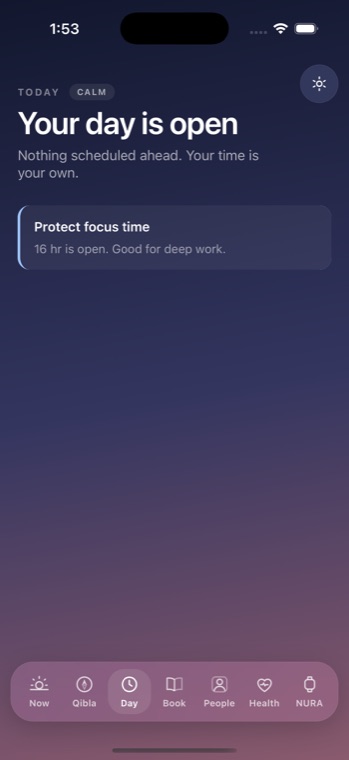
NURA organises your whole day and makes sure the things that must ring actually ring. Two pieces do this: a deterministic Day Director engine that turns your agenda into a calm, glanceable understanding of your time, and an alarm path that hands your reminders to iOS so they fire even when the app is closed and the phone is asleep. Both are built by NuroNova Genix Co. (Delaware; HQ Houston, Texas).
The Day Director
The Day Director reads your real agenda items and computes one calm answer to "what should I do now?" It never invents an event — everything it shows is derived from something you actually put on your day. It runs as a pure function that recomputes every second, so the read stays live without guesswork.
It produces a Future Window with four slots — Now, Next, Later, and Prepare — and resolves a single intelligence state at any moment: Leave now, Prepare now, Focus, In progress, Overdue, Next, Later today, or Clear day. Each item is timed from sensible per-kind defaults — a meeting assumes about 10 minutes of prep, a call about 5 — but any explicit number you attach always wins, so your real timings are respected.
Two design rules keep it honest:
- "Leave in" is never fabricated. A travel countdown appears only when the item actually carries travel time. NURA will not invent a commute.
- Every recommendation carries a plain-language "why." "Leave for the clinic in 12 min" is followed by "the clinic is at 3:00 and needs about 15 min of travel."
It also computes a Life Heat level — Calm, Balanced, Busy, or Full — from how much is packed into the window ahead, and offers up to three explainable suggestions: an open focus block before your next commitment, a warning when two things sit back-to-back, a note when the afternoon is overloaded.
AutoPilot: one calm nudge, never a stream
On top of the Day Director sits AutoPilot, which decides what — if anything — is worth surfacing on its own. It is deterministic: the facts come from the schedule, not from a language model, so it works even when Noora's AI is switched off. It builds a one-second Life Brief ("Now: standup. Next: review in 40 min. 90 min free ahead.") and selects exactly one primary suggestion, never a pile of them.
Proactive interruptions are held to a strict budget: a maximum per day, a cooldown between nudges, and quiet hours — with only genuinely critical items (like "time to leave") allowed to bypass the limits. In Observe mode it watches silently and never interrupts at all. You stay in control: you can tell it to stay quiet for the rest of the day and it keeps watching without a word until tomorrow.
Adding to your day, by hand or by voice
You can add appointments and alarms directly, or ask Noora to. Through her action tools she can put an appointment on your day, set an alarm, write a reminder on any page, or move something — with the reversible ones done instantly and the consequential ones (rescheduling, cancelling) parked for your tap first.
Alarms that ring with the app closed
Remembering an alarm is not the same as it ringing. The app isn't running at 6 a.m. — the phone is asleep — so the only thing that can wake you is a notification handed to iOS in advance. NURA schedules those ahead of time, using the same native path proven for the athan on a real device.
The details are deliberate:
- Reconcile, don't rebuild. When your agenda changes, NURA computes the minimum set of changes to what iOS is already holding, rather than cancelling everything and re-adding it — so an alarm due in the next instant never briefly stops existing.
- A real alarm tone. Each alarm names a 28-second tone bundled in the app, so a locked, closed phone plays a proper, insistent alarm — not iOS's short default ding. Tap it and the in-app ring takes over until you stop it.
- A modest, shared budget. iOS caps pending local notifications at 64, and prayer already claims a share, so the agenda takes a deliberately modest slice (up to 24) within a one-week horizon, re-planned as the week rolls forward.
- Edits reschedule correctly. Each notification's device id folds in its fire minute, so moving an alarm's time cancels the old one and schedules the new — it never silently keeps the old time.
- It respects the silent switch. A locked phone with the ringer on gets a real alarm; NURA does not claim to override Apple's hardware silent switch.
Privacy on the lock screen
A notification is rendered by iOS on a locked screen, where anyone holding the phone can read it. So the payload carries a title and nothing else — no location, no notes, no identifiers. If you marked the item private, even the title is withheld: it announces itself as "NURA" with "Something on your day," and you'll know what it is when you unlock. And on the web, where a browser tab genuinely cannot wake anyone at dawn, NURA says so honestly rather than pretending an alarm is set.
NURA is coming soon to iPhone — free, watch-first, offline by default, and built by NuroNova Genix Co. (Delaware; HQ Houston, Texas).
Get the athan, live — free
These times update every day. The NURA app keeps them live on your phone, calls the full athan at prayer time, points the Qibla, and shows it all on a living watch face — working offline, no account, no sign-in.
NURA — coming soon to iPhone