Turning on and using every watch feature
Beyond prayer times, NURA is a living watch. This page covers how to reach and use every feature — the Qibla compass, the eight daily tools, the chimes and spoken time, the alarm, and the keep-awake setting that powers them. Everything runs on your device; the AI is a separate, optional add-on. Built by NuroNova Genix Co.
The two faces
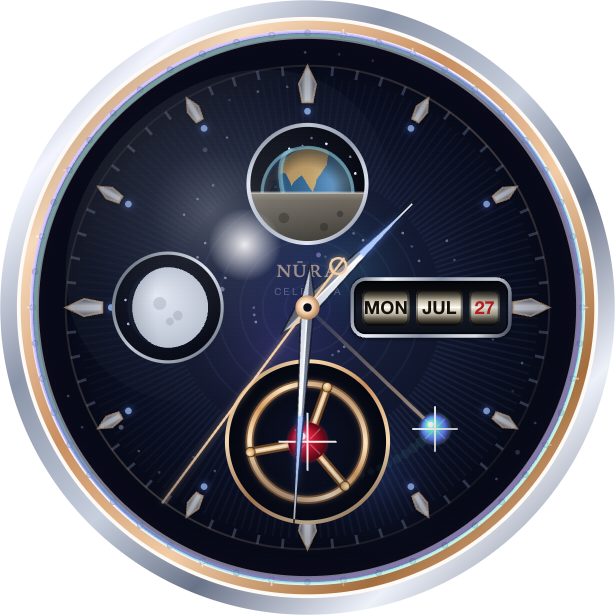
The Watch tab is a full-screen digital clock that doubles as your conversation with NURA: she writes what she says, the clock steps back to make room, and you answer by voice or by typing. Behind the digital hour sits Celestia — a hand-drawn, animated Canvas dial rendered at your device’s pixel ratio. It shows a live Earthrise seen from the Moon (a rotating Earth with a real day/night terminator cresting a grey lunar horizon), a silvery moon-phase, a flying tourbillon with a ruby, dauphine hands, and a mechanical day-date complication at 3 o’clock — all under a domed sapphire crystal. It tells the real time.
The Qibla compass
The Qibla has its own tab, because the direction of the Kaaba is wanted everywhere, not only before a prayer. It is honest about what it can and can’t know, and shows one of four states:
- No location — it says so and offers a way to set your city.
- Location but no heading — it gives the bearing from true north (e.g. “The Kaaba is 58° (ENE) from true north”) and how far away, and tells you to line the top of the phone up with north.
- Movement but no true north — it refuses to guess rather than swing a needle that points nowhere.
- A true-north heading — the compass rose tracks the Kaaba live, telling you “you’re facing the Kaaba” when you’re within 5°.
On the phone the compass starts on its own, reading the true magnetic heading from CoreLocation — no button needed. The dial also renders the sun’s azimuth and the moon phase, so it is a small celestial instrument as well as a Qibla finder.
The eight daily tools
The daily helpers are hidden by design so they never clutter the prayer screen. From the Now tab, swipe left to page through them one at a time, in this order:
- Adhkar — morning and evening remembrances with tap counters
- Qur’an khatm tracker — progress only (no mushaf text is embedded)
- The 99 Names — the canonical Tirmidhi order, exactly 99
- Ramadan & fasting
- Everyday duas
- Zakat calculator — nisab plus 2.5%
- World clock
- Water tracker
The Now screen itself also carries a tasbih counter (33/99 with haptics), a stopwatch and countdown timer, the Hijri date, and a sunrise/sunset arc. Tapping any tab in the bottom bar jumps straight there and skips the tools.
Chimes and the spoken time
NURA can behave like a classic talking watch. Three switches, all on by default, live in the chime settings:
- Hourly — the classic two-beep Casio time-signal at the top of every hour, followed by the hour spoken aloud.
- Pickup — lift the phone after it has sat still for an hour and NURA speaks the current time.
- Motion dismiss — an alarm keeps ringing until the phone senses you move it.
The time is read in the device’s own female voice through the OS speech engine — deterministic, free, and never the AI voice. It says “It’s 3 o’clock” on the hour and “It’s 3 oh 5” otherwise, the way a person would.
Keep the screen awake
The hourly chime, the full athan, the motion-dismiss alarm, and the pickup announcement all need NURA running in the foreground. Because iOS suspends a glanced-at phone after about 30 seconds, NURA holds the screen awake while it is open — this setting is on by default in Settings → Watch. iOS ignores it the moment you leave the app, so your phone still locks normally. Prefer to save battery? Turn it off, and those live features simply pause until you open NURA again. You can also set the clock to follow your phone or force 12- or 24-hour time here.
Turn on what you want, ignore what you don’t — nothing here needs an account or a connection. NURA is free and coming soon to iPhone from NuroNova Genix Co. (Delaware-registered, headquartered in Houston, Texas).
Get the athan, live — free
These times update every day. The NURA app keeps them live on your phone, calls the full athan at prayer time, points the Qibla, and shows it all on a living watch face — working offline, no account, no sign-in.
NURA — coming soon to iPhone